
Device
A device is a printer, or a Printer Group, that a print job can go to. Each printer is identified by its serial name, such as Form4-ExampleDevice, in every Formlabs API. PreForm lists both the printers on its local network and Dashboard printers/Printer Groups (if logged in to a Formlabs account).
How printers connect#
PreForm and PreForm Server reach printers on the local network. Printers reach Formlabs servers over the internet for Dashboard, remote printing, and firmware updates:
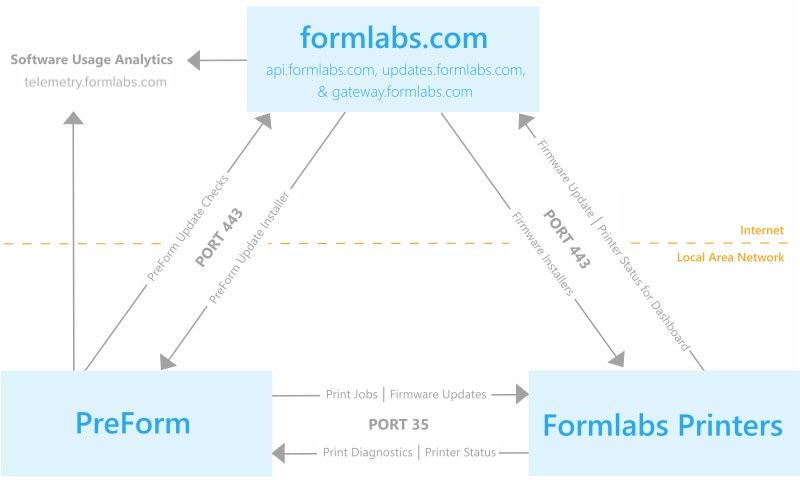
A printer connects over USB, over a local network with no internet access, or over an internet-connected local network. Remote printing and Dashboard need the printer on the internet. For more information, see Connectivity and security.
List devices with the PreForm API#
The list_devices method returns the same printers and Printer Groups that the printer list on the PreForm Job Setup screen shows:
# Disconnected devices aren't listed.
for device in preform.list_devices().devices:
print(device.id, device.product_name, device.status, device.ready_to_print_now)curl http://localhost:44388/v1/device/list/curl.exe http://localhost:44388/v1/device/list/Each record carries the device's id, its product_name, its status, and its ready_to_print_now flag. A printer record also carries the tank_material_code of the loaded resin tank, so code that routes orders across a fleet can pick a printer that already has the right material. Disconnected devices aren't listed.
To search the network first, call the discover_devices method. For more information, see Manually adding a printer to PreForm.