
Part labels
This script turns a .form file into a build report that travels with the build through post-processing and sorting. The report opens with a billing summary of every part by customer order and the material it used, followed by a bag label for each part.
View on GitHub Download part-labels.zip
The script uses the PreForm API to calculate the material each model uses with its supports and share of the raft, the build's total material usage, and it creates a rendered picture of each part from the .form file. The order number and customer each part belongs to would come from an order system, exported here as orders.csv.
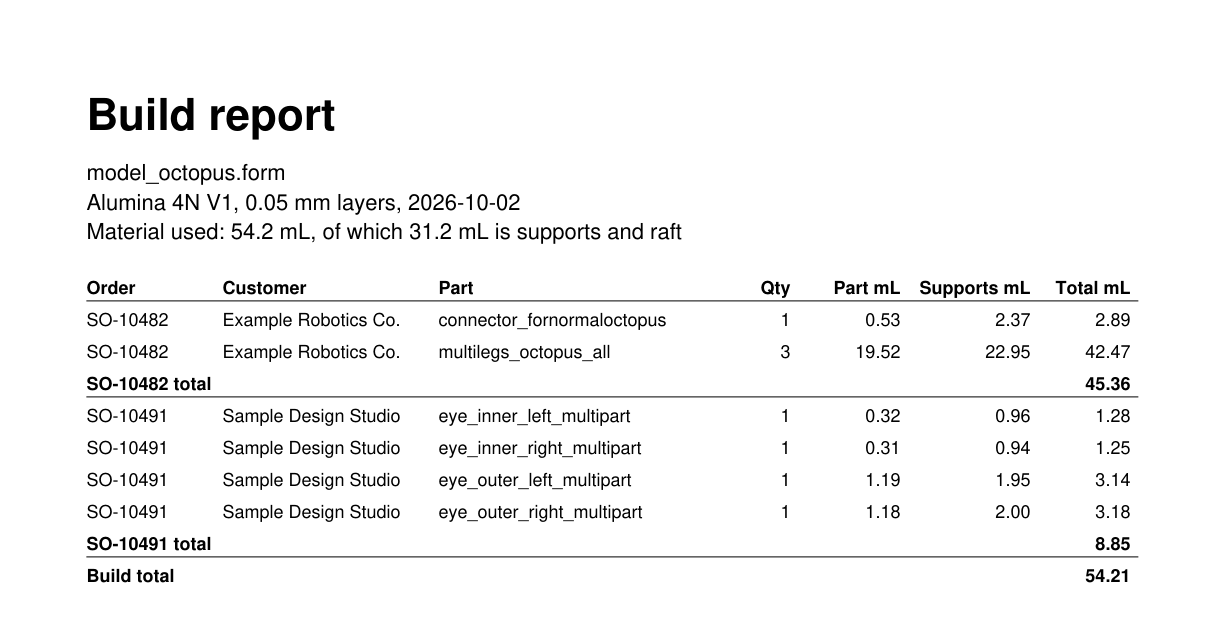
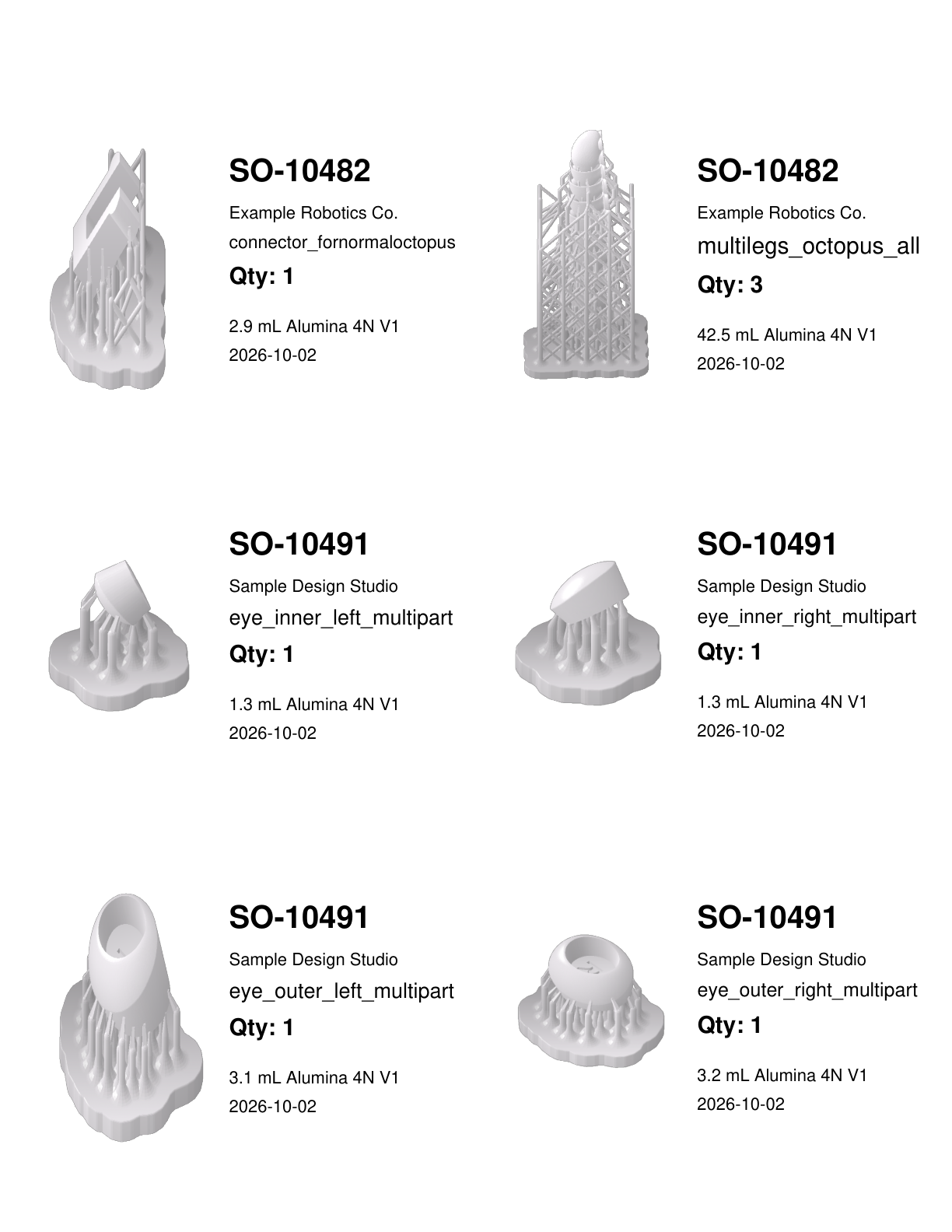
This example contains three files: generate_part_labels.py reads the build through the PreForm API, label_pdf_builder.py draws the PDF with PyMuPDF, and orders.csv stands in to represent an export from an order system.
Match parts to orders#
read_orders maps each part name to an order number and a customer, from the CSV export:
FORM_FILE = Path(__file__).parent / "model_octopus.form"
ORDERS_FILE = Path(__file__).parent / "orders.csv"
OUTPUT_PATH = FORM_FILE.with_suffix(".report.pdf")
DATE = datetime.date.today().isoformat()
PREFORM_URL = os.environ.get("FL_LOCAL_BASE_URL", "http://localhost:44388")
UNASSIGNED = ("UNASSIGNED", "No order found for this part")


def read_orders(path: Path) -> dict[str, tuple[str, str]]:
    """Map each part name to its (order, customer), from the order system's export."""
    with path.open(newline="") as f:
        rows = csv.DictReader(f)
        return {row["part"]: (row["order"], row["customer"]) for row in rows}
A part missing from the export is reported under UNASSIGNED, so a sorter sees it on the label before it goes into a bag.
Connect to PreForm#
Make sure PreForm is ready to accept connections.
main connects to PreForm, and exits with a hint if nothing answers:
def main() -> None:
    orders = read_orders(ORDERS_FILE)
    with FormlabsClient() as client:
        try:
            preform = client.preform.connect(base_url=PREFORM_URL)
        except PreFormApiError as exc:
            sys.exit(
                f"{exc}\nNo PreForm at {PREFORM_URL}; "
                "open PreForm and start its API server"
            )
PREFORM_URL defaults to http://localhost:44388. Set FL_LOCAL_BASE_URL to reach PreForm on another port or host.
Open the .form file#
open_form_file returns one scene for each build volume in the file, and each scene gets its own section of the report:
def fetch_builds(
    preform: PreFormApi,
    form_file: Path,
    orders: dict[str, tuple[str, str]],
    images: Path,
) -> list[Build]:
    """Open the .form file and return its builds, with a Label per distinct part."""
    opened = preform.open_form_file(file=str(form_file.resolve()))
The path is absolute because PreForm resolves it from its own working directory.
Group the models into parts#
Each scene's job metadata holds the material, the build's total material usage, and an entry for every model. A build usually holds several copies of one part, so the script groups models on their display name and mesh hash:
builds: list[Build] = []
try:
    for scene in opened.scenes:
        metadata = preform.get_scene_metadata(scene_id=scene.scene_id)

        # Copies of a part share a display name and a mesh hash, so grouping on that
        # pair gives one entry per distinct part, holding the metadata of every copy.
        parts: dict[tuple[str, str], list[dict]] = defaultdict(list)
        for model in metadata["Models"]:
            parts[(model["DisplayName"], model["RawMeshHash"])].append(model)

        labels: list[Label] = []
        for (name, _mesh), copies in parts.items():
            image = images / f"{len(builds):02d}-{len(labels):03d}.png"
The shape of the job metadata varies by printer family, so the script reads only the keys it reports. The mesh hash keeps two different meshes that share a display name on separate labels.
Render a picture of each part#
render_scene renders one copy of each part, zoomed and cropped to that model:
for (name, _mesh), copies in parts.items():
    image = images / f"{len(builds):02d}-{len(labels):03d}.png"
    preform.render_scene(
        scene_id=scene.scene_id,
        file=str(image),
        # The copies are identical, so any one will do
        model_ids=[copies[0]["Guid"].strip("{}")],
        view_type=RenderViewType.ZOOM_ON_MODELS,
        crop_to_models=True,
        image_size_px=600,
    )
The images go to a temporary directory that main removes after the PDF is written.
Record the material each part used#
Each model's metadata entry carries two volumes. ModelVolume_mL is the part alone, and Volume_mL adds the model's own supports and its share of the raft:
order, customer = orders.get(name, UNASSIGNED)
labels.append(
    Label(
        order=order,
        customer=customer,
        part=name,
        quantity=len(copies),
        # Volume_mL is the model plus its own supports and share of the raft, so
        # the parts' totals add up to the material the whole build uses.
        model_ml=sum(copy["ModelVolume_mL"] for copy in copies),
        material_ml=sum(copy["Volume_mL"] for copy in copies),
        image=image,
    )
)
The Volume_mL values of every model add up to the build's MaterialUsage_mL, so each order is charged for the material its parts consumed, supports included. The script sums the copies of a part because copies in different places on the build platform get different supports.
Sort the labels by order#
The labels for one order print next to each other, so a sorter can bag one order at a time:
# Sorters work one order at a time, so the labels for an order print together.
labels.sort(key=lambda label: (label.order, label.part))
Delete the scenes#
The finally block deletes every scene the file opened:
finally:
    for scene in opened.scenes:
        preform.delete_scene(scene_id=scene.scene_id)
Without it, a failure partway through leaves the scenes open on the server.
Lay out the report#
label_pdf_builder.py makes no PreForm API calls. draw_summary writes the billing page: every part with its order, customer, quantity, and material, a subtotal for each order, and the build total. draw_label puts the order number first, because that's what a sorter matches the bag to:
def draw_label(
    page: pymupdf.Page, box: pymupdf.Rect, label: Label, build: Build
) -> None:
    """Picture on the left; order, customer, part, quantity, and footer on the right."""
    pad = 0.08 * INCH
    inner = pymupdf.Rect(box.x0 + pad, box.y0 + pad, box.x1 - pad, box.y1 - pad)
    split = inner.x0 + inner.width * PICTURE_SHARE
    page.insert_image(
        pymupdf.Rect(inner.x0, inner.y0, split - pad, inner.y1),
        filename=str(label.image),
        keep_proportion=True,
    )

    footer = [f"{label.material_ml:.1f} mL {build.material}", build.date]
    # Centre the text block against the picture, then fill it in from the top down.
    text_pt = ORDER_PT + FOOTER_PT + PART_PT * PART_LINES + QTY_PT
    block = (text_pt + len(footer) * FOOTER_PT) * LINE + GAP_PT
    y = inner.y0 + max(0.0, (inner.height - block) / 2)

    def draw_row(y: float, text: str, size: float, font: str, lines: int = 1) -> float:
        """Draw one row of text at y, and return the y the next row starts at."""
        box = pymupdf.Rect(split, y, inner.x1, y + size * (LINE * lines + HEADROOM))
        return y + fit_text(page, box, text, size, font)

    # The order number leads: it is what a sorter matches the bag to.
    y = draw_row(y, label.order, ORDER_PT, BOLD)
    y = draw_row(y, label.customer, FOOTER_PT, REGULAR)
    y = draw_row(y, label.part, PART_PT, REGULAR, lines=PART_LINES)
    y = draw_row(y, f"Qty: {label.quantity}", QTY_PT, BOLD) + GAP_PT
    for entry in footer:
        y = draw_row(y, entry, FOOTER_PT, REGULAR)
The labels fill a US Letter sheet, six 4 x 3.333 inch labels to a page. To print on other stock or add fields, change the constants at the top of the file and the Label record; the API calls stay the same.
# Page Formatting
INCH = 72.0
PAGE_W, PAGE_H = 8.5, 11.0
LABEL_W, LABEL_H = 4.0, 3.333
COLS, ROWS = 2, 3
MARGIN_X, MARGIN_Y = 0.16, 0.5
PICTURE_SHARE = 0.47  # how much of the label's width the picture takes
PER_PAGE = COLS * ROWS

ORDER_PT, PART_PT, QTY_PT, FOOTER_PT = 20.0, 15.0, 15.0, 11.0
LINE = 1.35  # height of one printed line, as a multiple of the type size
HEADROOM = 0.4  # extra room insert_textbox needs above the first line of a box
PART_LINES = 1  # lines allowed for the part name; raise to 2 to let long names wrap
GAP_PT = 10.0  # blank space between the quantity and the footer
REGULAR, BOLD = "helv", "hebo"
Run the example#
In a terminal, run the script from the folder you unzipped. With pip, install the Formlabs SDK and PyMuPDF, which draws the PDF, first; with uv, uv run installs both from the example's pyproject.toml.
pip install pymupdf
python generate_part_labels.pyuv run generate_part_labels.pyThe script reads model_octopus.form and orders.csv from its own folder and writes model_octopus.report.pdf next to them. To report on another build, change FORM_FILE and ORDERS_FILE. The script prints what it found:
model_octopus.form: 6 labels, 54.2 mL of Alumina 4N V1
  SO-10482     1 x connector_fornormaloctopus      2.9 mL
  SO-10482     3 x multilegs_octopus_all          42.5 mL
  SO-10491     1 x eye_inner_left_multipart        1.3 mL
  SO-10491     1 x eye_inner_right_multipart       1.3 mL
  SO-10491     1 x eye_outer_left_multipart        3.1 mL
  SO-10491     1 x eye_outer_right_multipart       3.2 mL
-> model_octopus.report.pdf