
Layout modes
This script lays out 16 cubes on a Form 4 in one of five modes, each a different set of auto_layout_models options, and saves the result as a .form file.
View on GitHub Download layout-modes.zip
For each mode, the script:
- Opens
cubes.formwithopen_form_file. - Calls
auto_layout_modelswith the mode's options and a fixedseed. - Saves the build with
save_form_file.
Each mode shows one option, except production, which combines them. Layout across builds puts the options to work across several builds, and Pack across builds does the same for SLS builds with auto_pack_models. Pack modes compares the model locks that packing respects.

default: PreForm's defaults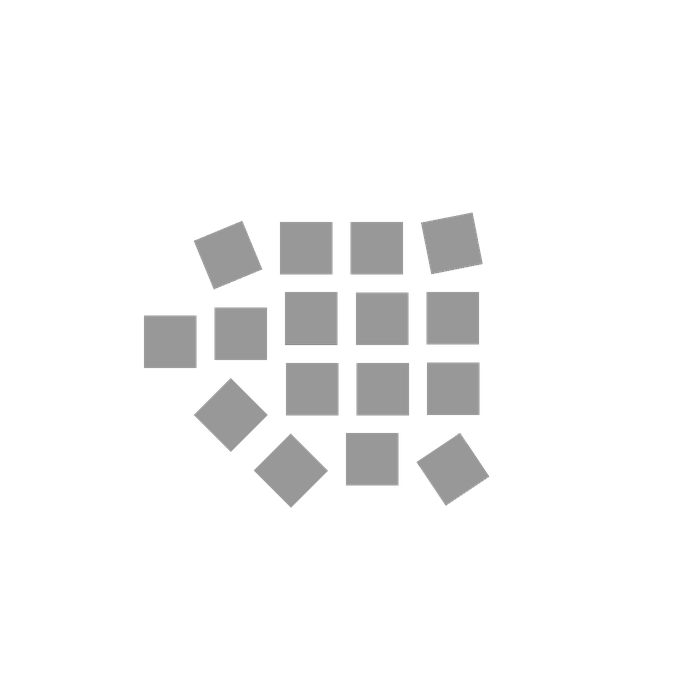
spaced: model_spacing_mm=5.0
locked: lock_rotation=True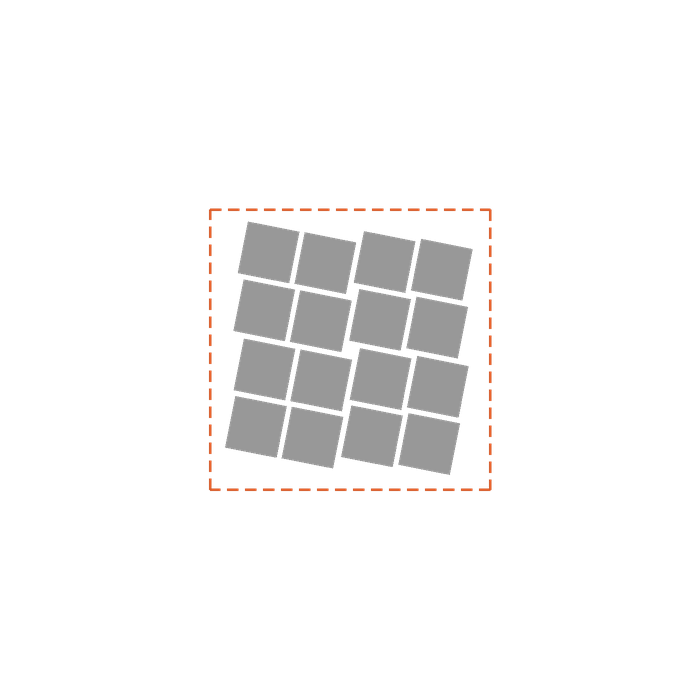
bounded: 80 by 80 mm custom_bounds, dashedThis example contains two files: layout_modes.py lays out the cubes, and cubes.form holds 16 cubes, 15 mm each, stacked at the center of a Form 4 build platform.
Choose the options#
Each mode is a set of keyword arguments for auto_layout_models:
# Each mode sets some of auto_layout_models' options. Every mode passes the same seed, so
# a run of a mode always gives the same layout.
MODES: dict[str, dict[str, Any]] = {
    # PreForm's defaults: 1 mm apart, anywhere on the build platform, turned as it likes.
    "default": {},
    "spaced": {"model_spacing_mm": 5.0},
    # Move each part without turning it.
    "locked": {"lock_rotation": True},
    # An 80 mm square in the middle of the build platform.
    "bounded": {
        "custom_bounds": LayoutBounds(x_min_mm=-40, x_max_mm=40, y_min_mm=-40, y_max_mm=40),
    },
    # Every option a production line sets, with more attempts and iterations than the
    # defaults for a seeded layout, 200 and 25000.
    "production": {
        "model_spacing_mm": 1.0,
        "lock_rotation": True,
        "custom_bounds": LayoutBounds(x_min_mm=-90, x_max_mm=90, y_min_mm=-55, y_max_mm=55),
        "layout_attempts": 500,
        "iterations_per_attempt": 50000,
    },
}
PreForm uses its default for any option a mode omits:
| Option | Default | What it changes |
|---|---|---|
model_spacing_mm | 1.0 | The minimum gap between models |
lock_rotation | False | True moves models without turning them |
custom_bounds | The build platform | A LayoutBounds rectangle to lay out within, in millimeters from the center of the build platform |
seed | A random seed each call | The same seed, models, and options give the same layout |
layout_attempts | Chosen by PreForm, or 200 with a seed | Independent attempts, of which PreForm keeps the best |
iterations_per_attempt | Chosen by PreForm, or 25000 with a seed | Optimization steps in each attempt |
Connect to PreForm#
Make sure PreForm is ready to accept connections.
main connects to PreForm at PREFORM_URL:
with FormlabsClient() as client:
    preform = client.preform.connect(base_url=PREFORM_URL)
PREFORM_URL defaults to http://localhost:44388. Set FL_LOCAL_BASE_URL to reach PreForm on another port or host.
Lay out the cubes#
auto_layout_models lays out every model in the scene with the mode's options:
# PreForm resolves paths from its own working directory.
scene_id = preform.open_form_file(file=str(FORM_FILE.resolve())).scenes[0].scene_id
try:
    preform.auto_layout_models(scene_id=scene_id, seed=42, **MODES[mode])
    preform.save_form_file(file=str(out.resolve()), scene_ids=[scene_id])
finally:
    preform.delete_scene(scene_id=scene_id)
Every mode passes seed=42, so each run of a mode gives the same layout. If the models don't all fit, the call fails with OPERATION_FAILED and leaves the scene unchanged.
Run the example#
In a terminal, run the script from the folder you unzipped. With pip, install the Formlabs SDK first; with uv, uv run installs it from the example's pyproject.toml.
python layout_modes.py defaultuv run layout_modes.py defaultThe modes are default, spaced, locked, bounded, and production. The script writes cubes.<mode>.form next to cubes.form. To try your own options, add a mode to MODES.
-> cubes.default.form