Serial numbers
This script labels every part in a build with a serial number through the PreForm API's label_models. Each label is placed in the model's own coordinate system, so the part's orientation in the scene doesn't matter.
View on GitHub Download serial-numbers.zip
For each build, the script:
- Opens the
.formfile withopen_form_fileand lists its parts withlist_models. - Numbers the parts in reading order on the build platform and fills in the serial template.
- Moves the label's anchor and directions from the part's own coordinates to the build platform's, using the part's
positionandorientation. - Calls
label_models, which projects the label from the anchor onto the part's surface. - Saves the labeled build with
save_form_file.
The serial template and the label's placement come from BUILDS in the script, which stands in for the part-numbering rules of a quality system.
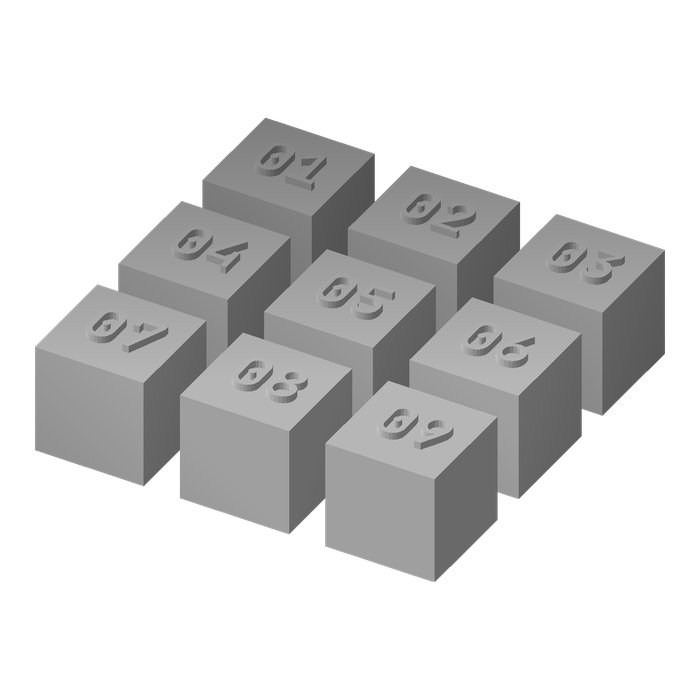
cubes: {n:02d} on the top face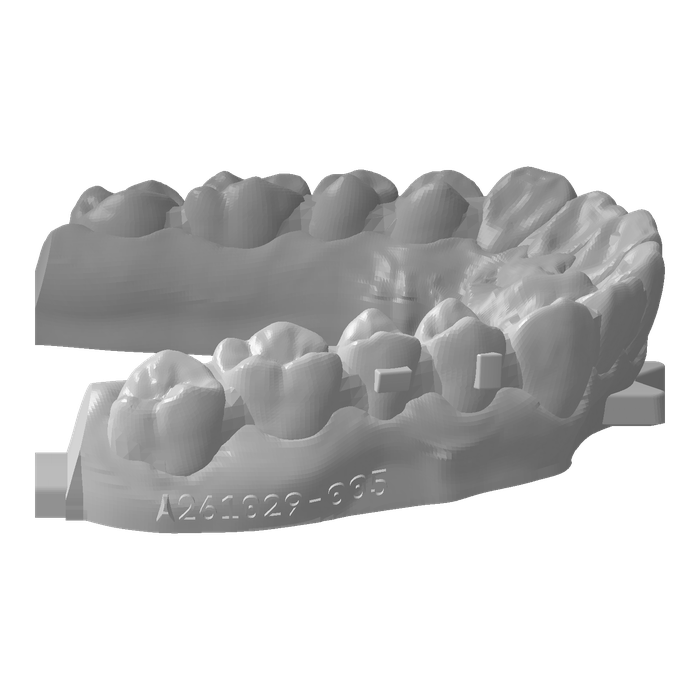
arches: A{date:%y%m%d}-{n:03d} on the baseThis example contains three files: serial_numbers.py adds the labels, and cubes.form and arches.form are the sample builds: nine cubes numbered on the top face, and seven dental arches on a Form 4 with a serial on the side.
Describe a build#
Each build names its .form file, a serial template, the label's size, and where the label goes:
@dataclass
class Build:
    form_file: str
    # A Python format string, filled in with the print date and the part's number.
    serial: str
    font_size_mm: float
    depth_mm: float
    # Where the label goes, in the coordinates the part's mesh file was made in. PreForm
    # projects the label from anchor, a point outside the part, onto the part's surface.
    # The label faces along facing, and its text reads along reading.
    anchor: Vector
    facing: Vector
    reading: Vector


BUILDS = {
    # 15 mm cubes with their origin at the center of the base, numbered on the top face.
    "cubes": Build("cubes.form", "{n:02d}", font_size_mm=8.0, depth_mm=1.0,
                   anchor=(0, 0, 30), facing=(0, 0, 1), reading=(1, 0, 0)),
    # Dental arches with the base on z = 0, the back on y = 0, and the front teeth
    # toward -y. The serial goes on the -x side of the base and reads toward the front
    # teeth, parallel to the build platform.
    "arches": Build("arches.form", "A{date:%y%m%d}-{n:03d}", font_size_mm=3.0, depth_mm=0.6,
                    anchor=(-50, -20, 2.5), facing=(-1, 0, 0), reading=(0, -1, 0)),
}
The template is a Python format string, filled in with the print date and the part's number in the build. The cubes get their place in the grid, 01 to 09. The arches get a serial such as A261029-001: a production line, the print date, and the part's number.
anchor, facing, and reading are in the part's own coordinates, the ones its mesh file was made in. Dental design software writes every arch in the same frame, so one anchor fits them all.
Connect to PreForm#
Make sure PreForm is ready to accept connections.
main connects to PreForm at PREFORM_URL:
with FormlabsClient() as client:
    preform = client.preform.connect(base_url=PREFORM_URL)
PREFORM_URL defaults to http://localhost:44388. Set FL_LOCAL_BASE_URL to reach PreForm on another port or host.
Open the .form file#
open_form_file returns the file's scene, and list_models gives each model's name, position, and orientation:
# PreForm resolves paths from its own working directory.
scene_id = preform.open_form_file(file=str(form_file.resolve())).scenes[0].scene_id
try:
    models = preform.list_models(scene_id=scene_id).models
    # Number the parts in reading order: back row first, left to right.
    models.sort(key=lambda m: (-round(m.position.y), m.position.x))
    for n, model in enumerate(models, start=1):
        serial = build.serial.format(date=datetime.date.today(), n=n)
The parts are numbered back row first, left to right, so a person unloading the build finds them in order.
Add the label#
label_models adds the serial to the model, at an anchor and directions turned by the part's yaw and moved by its position:
# A model's position is where its mesh file's origin sits on the
# platform, and its orientation turns the mesh about that origin. These
# parts print flat, so they only turn about z.
yaw = model.orientation.z
x, y, z = turn(build.anchor, yaw)
result = preform.label_models(
    scene_id=scene_id,
    model_ids=[model.id],
    label=serial,
    position=ScenePosition(x=model.position.x + x, y=model.position.y + y, z=model.position.z + z),
    # The label faces along z_direction and reads along x_direction.
    orientation=DirectionVectors(
        z_direction=list(turn(build.facing, yaw)), x_direction=list(turn(build.reading, yaw))
    ),
    font_size_mm=build.font_size_mm,
    depth_mm=build.depth_mm,
)
# A label missing some of its characters is a wrong serial.
if result.warnings:
    sys.exit(f"{model.name}: {'; '.join(result.warnings)}")
print(f"{serial:16} {model.name}")
PreForm places the label where a line from the anchor, against facing, meets the part's surface. label_models raises PreFormApiError with OPERATION_FAILED if the anchor misses the part. A label that's missing some of its characters succeeds with a warning, and the script stops on that too.
Save the build#
save_form_file writes the labeled copy, and the finally block closes the scene whether or not the save happened:
    preform.save_form_file(file=str(out.resolve()), scene_ids=[scene_id])
finally:
    preform.delete_scene(scene_id=scene_id)
Run the example#
In a terminal, run the script from the folder you unzipped. With pip, install the Formlabs SDK first; with uv, uv run installs it from the example's pyproject.toml.
Put serials on the cubes:
Terminalpython serial_numbers.py cubesTerminaluv run serial_numbers.py cubesPut serials on the arches:
Terminalpython serial_numbers.py archesTerminaluv run serial_numbers.py arches
The script writes cubes.serials.form or arches.serials.form next to the original. To number your own builds, add a Build to BUILDS.
A261029-001      case-2104
A261029-002      case-2107
A261029-003      case-2106
A261029-004      case-2101
A261029-005      case-2103
A261029-006      case-2102
A261029-007      case-2105
-> arches.serials.form